
When someone searches “dentist near me” or “best bakery in Indirapuram”, the first thing they usually see is not a website. It is a map with three business profiles.
That box, often called the local pack, is driven by Google Business Profile. Google itself says customers are 70% more likely to visit businesses with a complete profile (Google Business Profile Help).
This Google Business Profile optimization checklist covers the 15 steps we follow for SoftMantra’s local clients. Work through it once, then keep it up month after month.
Quick answer: To optimize your Google Business Profile, verify it, use your exact business name, pick the most accurate primary category, complete every field (services, hours, description, attributes), upload fresh photos monthly, post weekly updates, ask every customer for a review and reply to all reviews. Keep your name, address and phone consistent across the web.
In this guide
Why Your Google Business Profile Matters
Your profile is often the first impression a customer gets. They can call you, get directions, read reviews and visit your website without ever seeing a search result.
Reviews on that profile carry a lot of weight. BrightLocal’s 2026 survey found that 97% of consumers read online reviews for local businesses, and 74% only trust reviews from the last three months (BrightLocal, 2026). A neglected profile with old reviews quietly loses customers to the business next door.
If you have not created your listing yet, start with our step-by-step guide to adding your business to Google Maps.
How Google Ranks Business Profiles
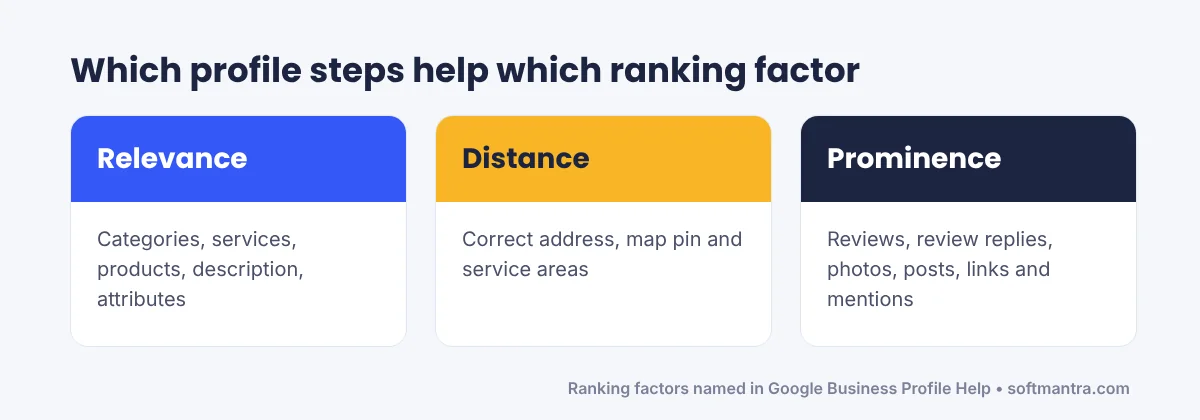
Google says local results are based mainly on relevance, distance and prominence (Google Business Profile Help). Each step in this checklist improves one or more of them:
We explain why map rankings matter so much for local businesses in Local SEO: Why Map Optimization Is Crucial.
Google Business Profile Optimization: 15 Steps
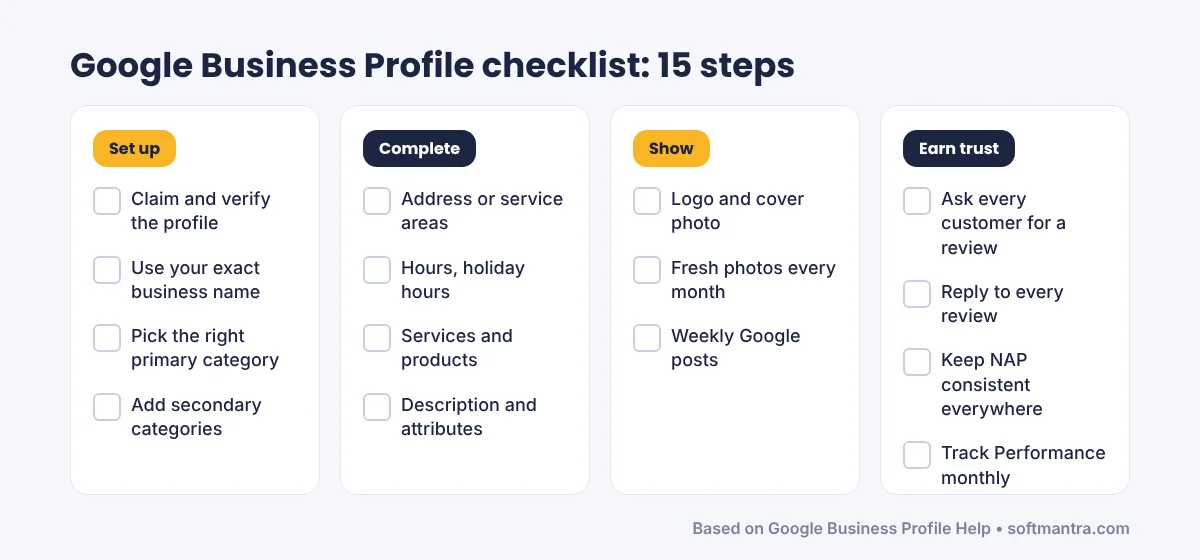
Set up the basics
- Claim and verify your profile. Unverified profiles have limited features and rank poorly.
- Use your exact business name. Match your signboard and documents. Do not add keywords or locations to the name.
- Pick the most accurate primary category. This is one of the strongest signals for which searches you appear in.
- Add relevant secondary categories for other services you genuinely offer.
Complete every field
- Add your address or service areas. Check that the map pin sits exactly on your location.
- Set regular and holiday hours, including Diwali, Holi and other festival closures.
- List your services and products with short descriptions and prices where possible.
- Write a clear description and choose attributes, such as wheelchair access or online appointments, that are true for your business.
Show your business
- Upload a logo and cover photo that look sharp on a phone screen.
- Add new photos every month: your team, premises, work and happy customers (with permission). Google recommends adding photos and videos regularly.
- Publish Google posts weekly: offers, events, new services or useful tips.
Earn trust
- Ask every satisfied customer for a review, using your review link on WhatsApp, email or a printed QR code.
- Reply to every review, good or bad, within a day or two. Thank people by name and solve problems publicly and politely.
- Keep your name, address and phone (NAP) consistent on your website, Justdial, IndiaMART, social profiles and other directories.
- Track performance monthly in the profile’s Performance section: calls, direction requests, website clicks and searches.
Do not have time to manage your profile every week? SoftMantra’s Google local business listing service handles setup, posts, photos and review replies for you.
How to Get More Google Reviews the Right Way
Reviews are the part most businesses struggle with. A simple system works best:
- Ask at the happiest moment, right after a successful job, delivery or appointment.
- Make it easy: send your direct review link, or display a QR code at the counter.
- Train your team to ask politely every time.
- Never offer discounts or gifts in return for reviews, and do not set up in-store review stations. Google’s help pages say both go against its review policies (Google).
When a negative review appears, a calm, helpful reply often wins more trust than the bad review loses. For businesses that receive many reviews, our online reputation management team can help, including specialised support for hotels and restaurants.
Common Mistakes That Hurt Your Profile
- Keyword stuffing the business name, which can lead to suspension.
- Using a virtual office or fake address that does not serve customers in person.
- Choosing a broad category like “Business” instead of the specific one, such as “Dental clinic”.
- Leaving old hours after a change, which leads to angry reviews from customers who find you closed.
- Buying fake reviews. Google removes them, and it can damage your profile for good.
How to Measure Results
| Metric | Where to find it | What to look for |
|---|---|---|
| Calls | Profile Performance | Steady growth month on month |
| Direction requests | Profile Performance | More people planning to visit |
| Website clicks | Profile Performance and GA4 | Traffic from Maps to your service pages |
| Search terms | Profile Performance | Which searches show your profile |
| Review count and rating | Your profile | New reviews every month, rating above 4.5 |
A strong profile works best with a strong website. Our guide to choosing an SEO company in Ghaziabad shows how both fit together, and our SEO packages guide explains which plans include Google Business Profile work.
Want your business in the top three on Google Maps? Talk to SoftMantra’s local SEO team or explore our local SEO services.
Frequently Asked Questions
How do I optimize my Google Business Profile?
Verify your profile, choose the most accurate primary category, fill in every field including services, hours and description, add fresh photos regularly, post updates, ask every happy customer for a review and reply to all reviews. Keep your name, address and phone the same everywhere online.
How long does it take for Google Business Profile changes to show?
Most edits appear within a few days, though some changes go through review first. Ranking improvements in the local pack usually build over several weeks as reviews, photos and activity add up.
Does adding keywords to my business name help ranking?
Adding extra keywords to your business name breaks Google’s guidelines and can get your profile suspended. Use your real business name exactly as it appears on your signage and documents.
How many Google reviews do I need?
There is no fixed number. What matters is a steady flow of recent, genuine reviews. BrightLocal found that 74% of consumers only care about reviews from the last three months, so consistency beats a one-time push.
Can I offer a discount in exchange for a review?
No. Google’s help pages say you should not offer incentives for reviews. You can simply ask customers and share your review link, but you cannot reward them for leaving one.
Do Google posts help ranking?
Google has not said posts are a direct ranking factor, but they keep your profile fresh, show offers and updates, and can increase clicks and calls. We recommend posting at least once a week.
Key Takeaways
- Google ranks local profiles on relevance, distance and prominence. Complete, active profiles do better on all three.
- Use your exact business name, the most accurate category and fill in every field.
- Fresh photos, weekly posts and a steady flow of genuine, replied-to reviews keep your profile ahead.
Bookmark this checklist and review your profile every quarter. Small, regular updates add up to more calls, visits and sales. For more on why listings matter, read the top benefits of Google local business listings.