
Great content cannot rank if Google cannot crawl it, index it or load it quickly. That is what a technical SEO audit checks.
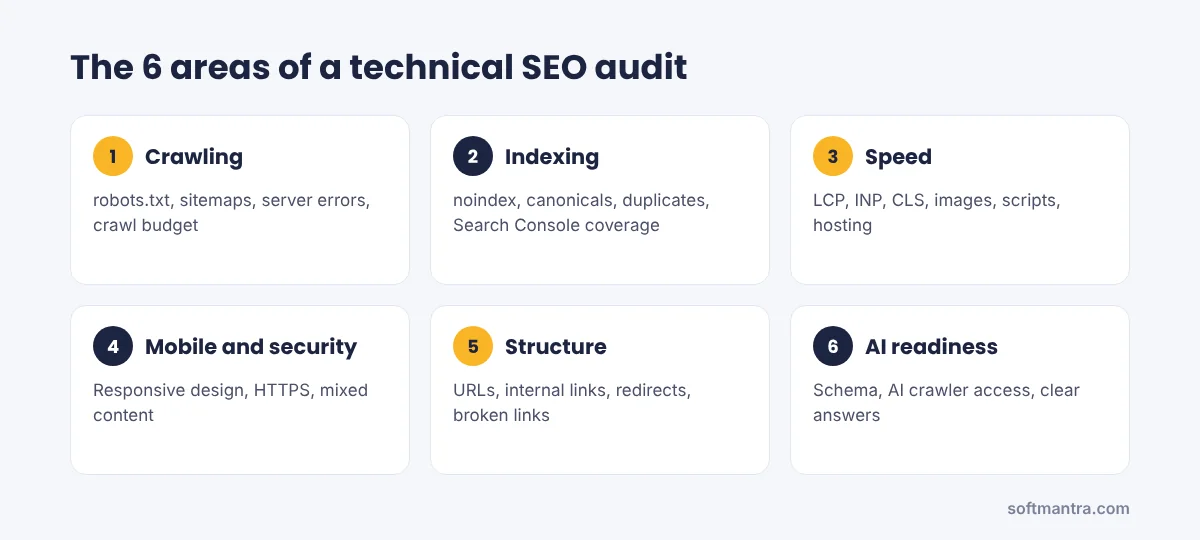
Google’s own Search Essentials set the minimum technical requirements: Googlebot must not be blocked, the page must work, and it must have indexable content (Google). This checklist goes well beyond that minimum. It is the same structure we use for SoftMantra audits, grouped into six areas with 40 checks.
Quick answer: A technical SEO audit checks whether search engines can crawl, index and quickly load your website. Cover six areas: crawling, indexing, speed (Core Web Vitals), mobile and security, site structure, and AI readiness. Fix blocking issues first, then speed and structure.
In this guide
Crawling: Can Search Engines Reach Your Pages?
- robots.txt does not block important pages or resources.
- An XML sitemap exists, lists only indexable URLs and is submitted in Search Console.
- No server errors (5xx) or long redirect chains on key pages.
- Important pages are reachable within a few clicks from the home page.
- JavaScript-rendered content is visible in the URL Inspection tool.
- AI search crawlers you want (such as OAI-SearchBot and PerplexityBot) are not blocked.
- Old URLs redirect with 301s, not 302s or meta refresh.
Indexing: Are the Right Pages in Google?
- No accidental noindex tags on important pages.
- Each page has one correct canonical URL. Our guide to canonical tags explains how.
- HTTP and HTTPS, www and non-www versions resolve to one version.
- No large groups of thin or duplicate pages (tags, filters, print pages).
- Search Console’s Page indexing report shows no unexplained exclusions.
- Hreflang is correct for multi-language sites. See our hreflang guide.
- Pagination and filters do not create endless crawlable URLs.
Speed and Core Web Vitals
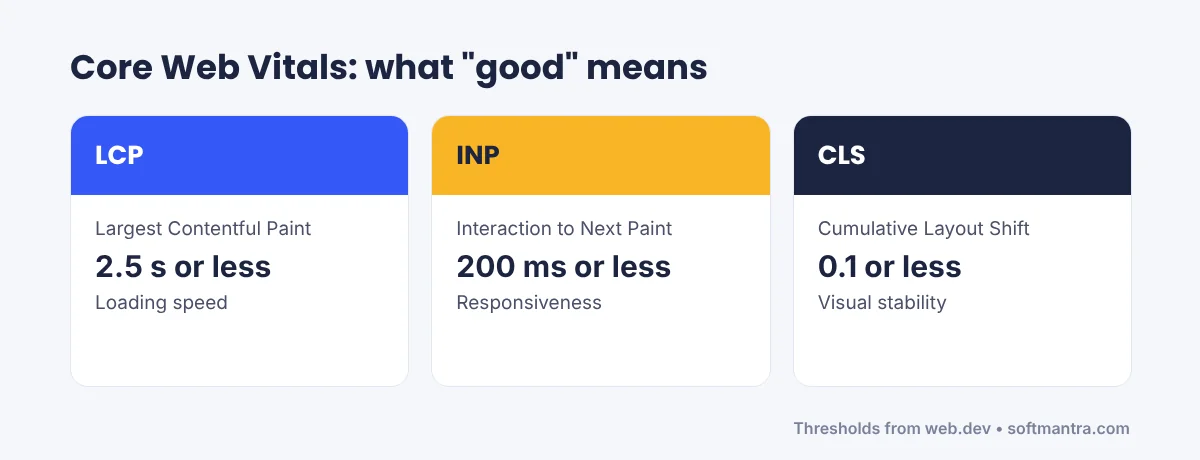
Google uses Core Web Vitals to measure real-user experience. The “good” thresholds are LCP of 2.5 seconds or less, INP of 200 milliseconds or less and CLS of 0.1 or less (web.dev). Google says its ranking systems use Core Web Vitals (Google).
- LCP image is not lazy-loaded and is compressed (WebP or AVIF).
- Fonts are preloaded or hosted locally to avoid layout shifts.
- Unused CSS and JavaScript are reduced.
- Images have width and height set.
- Caching and a CDN are enabled.
- Field data in Search Console’s Core Web Vitals report is “Good”.
We recently fixed a layout shift on our own home page by loading fonts locally, taking the mobile PageSpeed score from 85 to 98. For more fixes, read Core Web Vitals 2026: What Changed.
Mobile and Security
- Pages are fully responsive and pass mobile usability checks.
- Mobile and desktop show the same main content (Google indexes the mobile version).
- The whole site uses HTTPS with no mixed-content warnings.
- Pop-ups do not block content on mobile.
- Tap targets and text are readable without zooming.
Our mobile-first indexing checklist goes deeper on this area.
Want a full technical audit with a prioritised fix list? Get an SEO audit and growth plan from SoftMantra.
Site Structure and On-Page Basics
- URLs are short, readable and use hyphens. See SEO-friendly URL structure.
- No broken internal links (4xx).
- Important pages get strong internal links. See our internal linking guide.
- Each page has one H1 and a logical heading order.
- Title tags and meta descriptions are unique and within length.
- Orphan pages (no internal links) are fixed or removed.
- Breadcrumbs are present on deeper pages.
Structured Data and AI Readiness
- Organization, Article, Product or LocalBusiness schema is present and valid.
- Structured data matches visible content.
- Key answers are in plain HTML, not only in images or PDFs.
- Pages are snippet-eligible (no unwanted nosnippet rules).
- Author pages and contact details are easy to find.
- robots.txt choices for AI crawlers are deliberate, not accidental.
- Important pages answer the main question near the top.
- Search Console and GA4 are connected and tracking conversions.
If you are planning a redesign or domain change, follow our site migration guide as well.
Prefer an expert to run these 40 checks for you? Our technical SEO consultants can audit and fix your site.
Key Takeaways
- Fix crawling and indexing blockers first. Nothing else matters until Google can see your pages.
- Aim for good Core Web Vitals: LCP 2.5 s, INP 200 ms, CLS 0.1.
- Re-run the audit every quarter and after every major site change.
Frequently Asked Questions
How often should I do a technical SEO audit?
Run a full audit at least once a quarter, and always after a redesign, migration or big content change. Check Search Console weekly for new errors.
What tools do I need for a technical SEO audit?
Google Search Console, PageSpeed Insights and a crawler such as Screaming Frog are enough to start. Tools like Ahrefs or Semrush add backlink and competitor data.
What are good Core Web Vitals scores?
LCP of 2.5 seconds or less, INP of 200 milliseconds or less and CLS of 0.1 or less, measured on real user visits.
What should I fix first after an audit?
Anything that blocks crawling or indexing comes first, then speed and mobile issues, then structure and on-page fixes.