
A one-star review can ruin your morning. It feels unfair, it is public, and it sits right below your business name on Google. The natural reaction is to defend yourself. That is usually the wrong move.
In our online reputation management work, we have seen that the reply often matters more than the review. Future customers read both, and they judge your business by how you respond.
Quick answer: To respond to a negative Google review, reply within a day or two, thank the reviewer, acknowledge the problem without arguing, briefly explain what you are doing to fix it, and invite them to continue the conversation privately by phone or email. Never share private details. If a review is fake or breaks Google’s policies, report it instead of arguing.
In this guide
Why Your Reply Matters More Than the Review
Google itself says negative reviews are not necessarily a sign of poor business practices, and that a positive reply and follow-up can show you care and may encourage the reviewer to update their review (Google). When a reviewer edits their review, the date changes to show the latest update (Google).
Before You Reply
- Wait a few minutes. Never reply while angry.
- Check your records. Was this a real customer? What happened?
- Find the real issue. Late delivery, rude staff, wrong bill or a misunderstanding?
- Decide the fix. Refund, redo, call back or explanation.
- Make sure your profile is verified. Google requires a verified business to reply (Google).
A Simple 5-Part Reply Formula
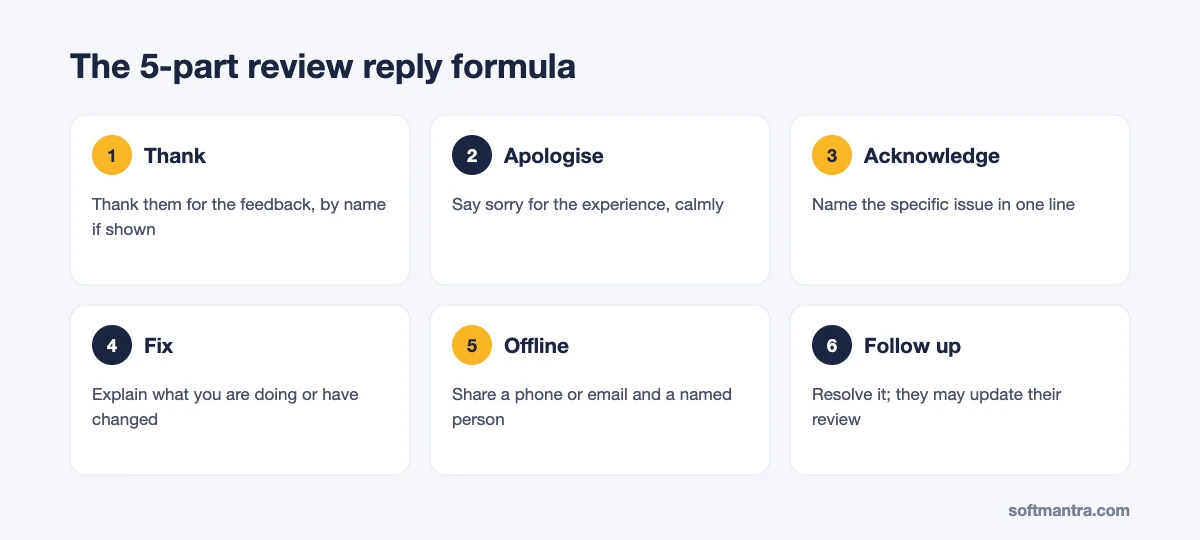
- Thank them for the feedback, using their name if shown.
- Apologise for the experience, not necessarily for every claim.
- Acknowledge the specific issue in one line so others see you listened.
- Explain the fix or what you have changed.
- Take it offline with a phone number or email and a named person.
Keep replies short, usually three to five sentences. Long defensive replies look worse than the review.
Getting a lot of bad reviews at once? SoftMantra’s ORM services help businesses respond, recover and build a stronger review profile.
Reply Templates You Can Adapt
Slow service or delay
Template
Hi [Name], thank you for telling us about this, and we are sorry you had to wait. That is not the experience we want for anyone. We have since added staff during peak hours. Please call [Manager name] on [number] so we can make this right.
Product or service problem
Template
Hi [Name], we are sorry the [product/service] did not meet your expectations. We would like to fix this for you. Please email [email] with your order details and our team will arrange a replacement or refund.
Rude staff complaint
Template
Hi [Name], thank you for raising this. Every customer should be treated with respect, and we have shared your feedback with our team. Please call [Manager name] on [number]; we would like to hear more and put it right.
When you cannot find the customer
Template
Hi [Name], thank you for your feedback. We could not find a record of your visit, but we take every concern seriously. Please contact us at [email] with a few details so we can look into this.
For clinics, hospitals, lawyers and financial advisers, never confirm that someone is your client or mention any personal detail. Keep the reply general and move the conversation offline. See our guide to local SEO for doctors for more.
Fake or Abusive Reviews
You cannot delete reviews yourself. If you believe a review violates Google’s content policies, for example spam, fake engagement, hate speech or a conflict of interest, you can report it (Google).
- Report it from your Business Profile and choose the right violation type.
- Still reply politely, so customers see your side while Google reviews the report.
- Keep evidence, such as the absence of any booking, in case you need to escalate.
- Never respond with fake positive reviews; that breaks Google’s policies too.
Reduce Negative Reviews Over Time
- Ask every happy customer for a review using your review link or QR code (Google).
- Fix the recurring problems that reviews mention.
- Set clear expectations on timings, prices and delivery.
- Train staff to resolve complaints on the spot.
- Keep your Google Business Profile accurate. Our GBP checklist helps.
Want a stronger online reputation? Talk to SoftMantra about a free review and reputation audit.
Key Takeaways
- Reply to every negative review quickly, calmly and briefly.
- Thank, apologise, acknowledge, fix and take it offline.
- Report fake or abusive reviews instead of arguing, and build a steady flow of genuine reviews.
Frequently Asked Questions
Should I reply to every negative review?
Yes. Your reply is public and future customers read it. A calm, helpful reply shows how you treat customers when something goes wrong.
Can I delete a negative Google review?
No. Business owners cannot delete reviews. If a review breaks Google’s content policies, you can report it for Google to review.
How fast should I reply?
Ideally within one or two working days. A quick reply shows you take feedback seriously and gives you a better chance of resolving the issue.
Can the customer change their review after my reply?
Yes. Google notes that reviewers are notified of your reply and can update their review, and the review date changes when they do.